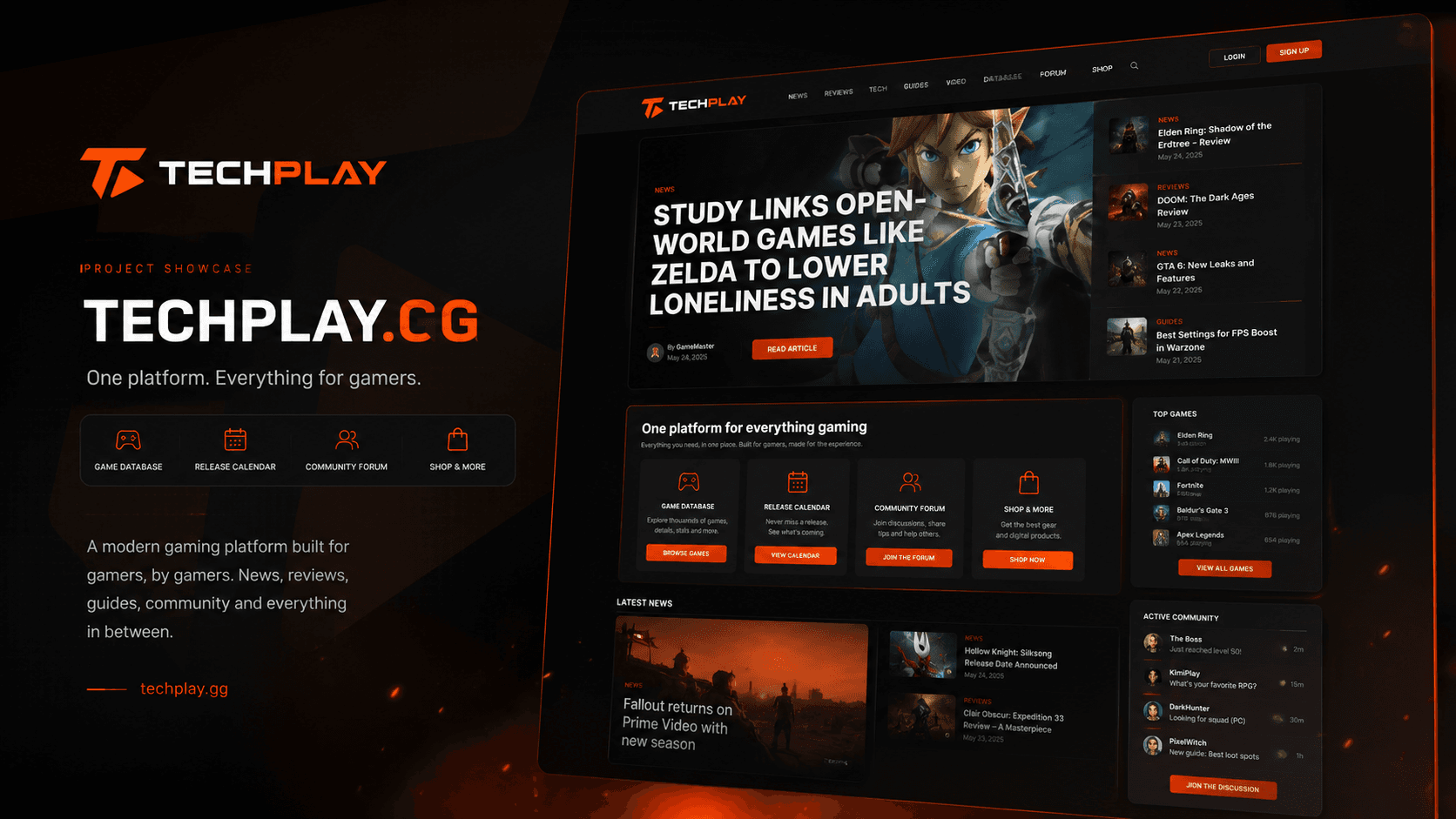
Web Development
Company websites, online shops and web applications, built in Next.js. TechPlay’s database of more than 200,000 games runs on the same stack.
Most companies have repetitive work hidden between their systems: answering the same questions, moving data between tools, processing documents and following up on routine requests. We design assistants and workflows that take over the repeatable parts while keeping people involved where judgement or approval is needed.
We start with one process that consumes measurable time, automate it end to end and compare the result with the way it works today. Once the value is clear, the same approach can be extended to the next workflow.
Support and sales assistants grounded in your approved knowledge, designed to answer routine questions, guide customers to the right information and hand conversations to a person when the request needs judgement or further help.
Connect CRM, email, spreadsheets, forms, invoicing and internal tools so information moves between them automatically. We use platforms such as n8n or Make where they fit, and custom code when the workflow needs more control.
Turn invoices, orders, forms and other documents into structured data that can be checked, routed and entered into the systems your team already uses, with human review reserved for exceptions or low-confidence cases.
Incoming enquiries can be classified, enriched and routed to the right person or system, with the relevant context prepared in advance and a draft response generated where appropriate.
Private assistants grounded in your own documents, policies and internal knowledge, helping teams find answers, summarise information and work with company material more efficiently.
Language models integrated into your product or workflow through APIs, with clear scope, evaluation, safeguards and monitoring around the tasks they are expected to perform.
What you receiveA prioritised automation roadmap with the expected time savings and complexity of each opportunity.
What you receiveA working automation handling real tasks in a controlled environment.
What you receiveA reliable workflow with clear fallbacks, monitoring and human handoff where needed.
What you receiveA measured view of the time, cost and operational impact of the automation.
What you receiveA reusable automation layer that can support more work without increasing manual effort at the same rate.
200K+
games, each with a page of its own
For a gaming platform, we built internal workflows and data-driven tools that automate recurring content operations across a catalogue of more than 200,000 titles.
View case studyWe choose tools based on the requirements of the project, your existing systems and what will be practical to maintain after delivery. Below are the technologies we typically use for this type of work, and why.
We select the model according to the task, balancing reasoning quality, reliability, latency, privacy requirements and cost rather than building the workflow around a single provider.
For workflow automation that benefits from flexible integrations and greater control over how data moves between systems, including self-hosted deployments where the project requires them.
A practical fit for straightforward integrations where fast implementation and easy maintenance matter more than custom infrastructure.
Used when off-the-shelf connectors are not enough — for custom integrations, business logic, data processing and services that need more control than a visual automation platform provides.
For structured business data and searchable knowledge bases that allow assistants to retrieve relevant information from approved company material when a workflow requires it.
A before-and-after view of the workflow, including time saved, processing speed, exception rates and the amount of manual work still required.
Clear boundaries, human handoff, logging and fallbacks are built into the workflow so exceptions can be reviewed instead of silently failing.
We minimise the data each workflow needs, document where it is processed and use hosting or deployment options that match the project’s privacy and compliance requirements.
Integrations, monitoring and shared components from the first workflow can often be reused, making later automations faster to build and easier to operate as part of one system.
If you cannot find the answer below, send us your question. A member of our team will reply within one business day.
Ask a questionA process audit typically takes about a week, followed by two to four weeks for the first working pilot. Reliability testing, safeguards and production handover usually follow over the next couple of weeks. More complex integrations take longer, and the timeline is defined in the written scope before development begins.
Pricing depends on the workflow, the systems involved, the amount of custom integration and the level of reliability or human oversight required. After the process audit, we provide a written scope and fixed quote for the pilot, together with the expected operational benefit and how it will be measured.
Your business retains control of the workflow, its configuration and the client-owned accounts it depends on. We document the logic, integrations and data flows, and hand over the agreed configuration and custom code so the system can be maintained by your team or another provider. Third-party services remain subject to their own licence and data terms.
Automation makes the most sense where the same digital task happens repeatedly and follows a reasonably clear process — for example handling routine enquiries, moving information between systems, processing documents or sending follow-ups. If a task depends on fresh judgement every time, we usually leave that decision with a person.
We design workflows around data minimisation: each system receives only the information it needs for the task. Where required, we can use EU-based or private deployment options, and we document the services involved, where data is processed and which safeguards apply before the workflow goes live.
That possibility is designed for from the start. We define what the system may handle on its own, when it should ask for clarification and when it must hand the task to a person. Important actions can require human approval, while logging and monitoring make exceptions visible for review.
The goal is usually to remove repetitive parts of the work rather than replace the role itself. Time spent copying data, processing routine requests or chasing follow-ups can move back to work that needs judgement, context and human interaction.
Yes. We use the same discipline for product features: a clearly defined use case, measurable evaluation before launch, appropriate fallbacks and monitoring afterwards. We can take an AI feature from an early idea through specification, integration and production rollout.
Company websites, online shops and web applications, built in Next.js. TechPlay’s database of more than 200,000 games runs on the same stack.
iOS and Android apps from a single React Native codebase. The Federalna.ba app is one of them.